 WP Accessibility Knowledge Base
Write meaningful link text
Rule of thumb: a link text should describe the resource that it links to, so that when the text is read out of context the user will still know what to expect. A link is a promise, not a surprise.
Link text should stand on its own. Some assistive software scans a page for links and presents them to the user as a simple list. In these situations, all the links will be read out of context. So it is important the text used in a link is descriptive and meaningful.
It also makes your text easier to scan visually, so that sighted users can more quickly find the information they’re looking for.
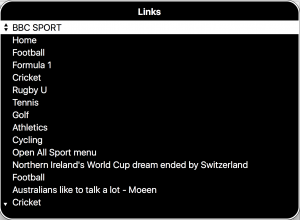
Saar Twito comprehensively explains the concept of good link text in Descriptive Link Text: The Art of Clear Digital Signposting.
Make links texts descriptive
Avoid meaningless link text like: “click here”, “download”, “info”, “more”, “here”, “this” or other similarly empty phrases.
With these types of links, users have to read the whole sentence to understand the purpose of the link. This makes your content less browsable, and harder to engage with. Screen reader users cannot navigate by links, because those links are not useful without additional context.
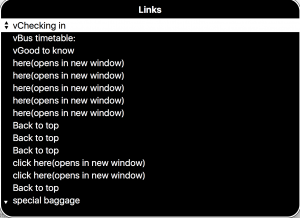
Don’t: write poor quality (non-descriptive) link text:
If you are interested in our work, click here to subscribe to our newsletter. You can download the manual of the espresso machine, or contact us for more info.
Do: write helpful (descriptive) link text:
Subscribe to our newsletter if you are interested in our work. You can download the manual as a PDF of the espresso machine, or contact us for more info.
Avoid fancy character combinations in your links
Avoid for example in your link texts:
- ASCII art, example: \ō͡≡o˞̶
- Emoticons, example: <3
- Leetspeak, example: m8ts
- Excessive use of Emoji
ASCII art is invariably meaningless to screen reader users. Emoticons are occasionally interpretable, but are confusing and difficult to understand. “Leetspeak” is unpronounceable, and creates difficulties for comprehension. Emoji are independently accessible; they do have text alternatives. However, a large number of emoji can make the text effectively impossible to comprehend.
Don’t: overload your link text with emoji.
I 👏 approve 👏 this 👏 message 👏 .
Do: keep your link text clean, to the point and simple.
I approve this message 👏 .
Avoid writing links in all caps
Sequences of all capital letters are harder to read for people with dyslexia, screen readers may interpret short capitalized words as abbreviations, and read the words out character by character. This is also true if text is capitalized using CSS.
Don’t: use all caps as link text.
ACT NOW.
Do: use sentence case or title case as link text.
Act now or Act Now.
Avoid using complete URLs as link text
Some URLs are highly readable, such as “wordpress.org”. Others are almost impossible to parse as language. In most cases, you should avoid using a URL as the visible link text. If you are explicitly referring to a web address, keep it short: wordpress.org instead of https://www.wordpress.org.
Don’t: use a url as link text:
We keep track of all the issues in: https://github.com/wpaccessibility/wp-a11y-docs/issues/85.
Do: write meaningful and readable link text:
We keep track of all the issues in: Content pages: create or review or rewrite.
Avoid the title attribute on links
You should not use the title attribute on links, because the title attribute is only available for sighted users on desktop using a mouse. Other users will miss that information.
In addition, screen readers announce the title attribute inconsistently. You must be sure that all users get the information they need and the title attribute doesn’t provide that certainty.
Don’t: use a title attribute on links.
<a href="some-url" title="download the PDF">manual</a>
manual
Do: add all info in the link text, so everyone has the same information and it is always visible.
<a href="some-url">download the manual as PDF</a>
download the manual as PDF
Resources
Related WCAG Success Criteria for links
By giving a meaningful link text, you meet WCAG success criteria
- 2.4.4 Link Purpose (In Context) (level A).
- 2.4.9 Link Purpose (Link Only) (level AAA).
- 2.5.3 Label in Name (level A).
Other resources
- Descriptive Link Text: The Art of Clear Digital Signposting by Saar Twito.
- Designing Better Links UX on Smart Interface Design Patterns.
- Writing for Web Accessibility , by the W3C.
- Links and Hypertext, by WebAIM
- Creating the perfect link, by The A11Y Collective.