 WP Accessibility Knowledge Base
Link destinations
Rule of thumb: Always tell a visitor what to expect when selecting a link.
Open a link in a new window or tab?
Opening a link in a new window or tab unexpectedly can disorient users. It also breaks the “back button”. The best practice is to let users decide if they want to open a link in a new tab or window.
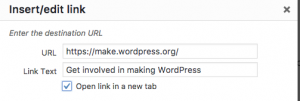
Not all screen readers alert users when a new window or tab has opened and for those with cognitive disabilities, they may have trouble interpreting what’s happened.
This can be prevented by not checking “open link in a new target” on links, so they don’t trigger new windows or tabs to open.
But what if you insist?
If you absolutely need to open a link in a new window, you need to tell your visitor in the link text.
For example: I love cats, so I watch cat videos (opens in a new tab) on YouTube.
Link to a document
If the link opens a document, add the format of the document in the link text.
You can download the manual as PDF.