 WP Accessibility Knowledge Base
Avoid HTML form validation
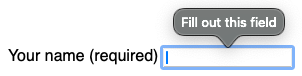
At this time (January 2026), form validation by the browser is not sufficiently accessible. Add custom client-side validation to make for errors understandable for all users.
required versus aria-required
Modern browsers can automatically check whether a required field has been filled out. This happens when the HTML attribute required is present on the form field.
<input type="text" id="example" name="example" required />
Using required triggers client-side form validation of the browser.
Native HTML validation has accessibility and internationalization issues. The error messages are not specific enough, they disappear after a few seconds, and they currently lack sufficient screen reader support.
In many browsers, native messages about required fields are not communicated consistently to all users. There is also no explanation when specific patterns are not met, as Adrian Roselli points out in Avoid default field validation.
It is preferable to add custom client-side validation. If you decide to use required, also use novalidate on the form element to prevent the browser’s form validation from kicking in and enable you to handle validation server-side.
To specifically communicate to assistive technologies that a field is required, use aria-required="true".
<input type="text" id="example" name="example" aria-required="true" />
Find more information about the use of aria-required in Indicate required fields for screen readers.
Progressive enhancement
Although we discourage HTML form validation and do not consider it a final solution, it can be useful as a fallback when there is a poor internet connection and JavaScript is not yet available.
This option applies only to forms where error messages are handled by JavaScript.
If you are using accessible client-side validation, you can handle these cases by following these steps:
- Use the required attribute on form fields instead of aria-required.
- As soon as the JavaScript loads, immediately add the novalidate attribute to the
<form>element to disable HTML validation.
This prevents users with a poor internet connection from not being informed about form errors in time.
This is an option, not a requirement. Ultimately, a server-side final validation of form fields is the most secure and accessible solution, and therefore the recommended way to handle form validation.
Resources
- NL Design System Guidelines for web forms (Dutch content).