 WP Accessibility Knowledge Base
Provide a summary with form errors above the form
A user-friendly way to display errors is a combination of a summary above the form and repeating the error message for each form field.
Each error message in the summary is also a link to the corresponding form field. This allows keyboard users to jump directly to the field with the error.
Set up of an error summary
The structure is as follows:
- After submitting a form with errors, a list of errors is displayed above the form.
- This list has a heading with text like: “There was a problem with your submission. Please fix the errors below before continuing.”
- Below the heading is a list of error messages. Each error message is also a link to the corresponding form field.
- The heading above the errors receives keyboard focus. This ensures it is immediately visible, read aloud by screen readers, and that the tab order is logical: the links to the relevant fields are the next focusable items.
GOV.UK provides several clear examples of the Error summary component.
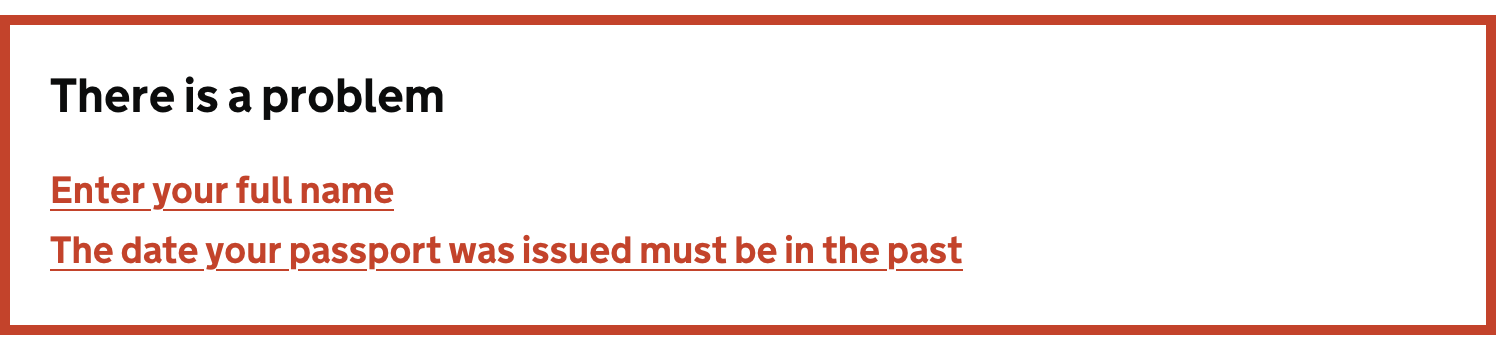
For very short forms with one or two fields, this way of error indication may be overkill. But always make sure screen reader users know there is an error and the keyboard focus is placed in a convenient spot.
Clear error messages are required to meet WCAG success criterion 3.3.1 Error Identification (Level A).
Setting an error summary in WordPress Plugins
Gravity Forms
For a newly created form, go to the Form Settings tab and check Validation Summary: “On”.
Other form plugins
We’d like to invite people familiar with other plugins to add instructions for those plugins. Please contact us if you want to help us with additional content.
Resources
- NL Design System Guidelines for web forms (Dutch content).