 WP Accessibility Knowledge Base
Fieldset and legend to group form fields
Group form fields that belong together inside a <fieldset> with a descriptive <legend>. The advantage to this is that the form fields are grouped together both visually and semantically, making the design match the code.
The fieldset and legend elements are the native HTML way to group fields. When a screen reader enters a fieldset, the legend of that group will be announced. This is a helpful way of grouping related fields together, such as differentiating between an order address and a shipping address; but is critical when grouping radio buttons and checkboxes.
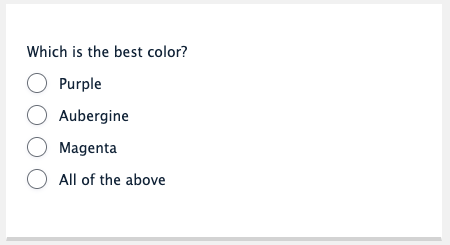
<fieldset>

    <legend>Which is the best color?</legend>

    <input name="colorOption" type="radio" id="purple" value="purple" />
    <label for="purple">Purple</label>

    <input name="colorOption" type="radio" id="aubergine" value="aubergine" />
    <label for="aubergine">Aubergine</label>

    <input name="colorOption" type="radio" id="magenta" value="magenta" />
    <label for="magenta">Magenta</label>

    <input name="colorOption" type="radio" id="all" value="all" />
    <label for="all">All of the above</label>

</fieldset>
WCAG requires that the structure and relationships are programmatically determinable, and fieldset/legend is one way to meet that. The same can be achieved by using role="group" and aria-labelledby. But always keep the first rule of ARIA use in mind:
If you can use a native HTML element or attribute with the semantics and behavior you require already built in, instead of re-purposing an element and adding an ARIA role, state or property to make it accessible, then do so.
Example using ARIA (not preferred)
<div role="group" aria-labelledby="dummy-legend">

    <h2 id="dummy-legend">Which is the best color?</h2>

    <input name="colorOption" type="radio" id="purple" value="purple" />
    <label for="purple">Purple</label>

    <input name="colorOption" type="radio" id="aubergine" value="aubergine" />
    <label for="aubergine">Aubergine</label>

    <input name="colorOption" type="radio" id="magenta" value="magenta" />
    <label for="magenta">Magenta</label>

    <input name="colorOption" type="radio" id="all" value="all" />
    <label for="all">All of the above</label>

</div>
Resources
WCAG Success Criteria for naming grouped form fields
Naming grouped form fields is necessary to meet the WCAG success criteria:
- 1.3.1 Info and relationships (Level A).
- 3.3.2 Labels or Instructions (Level AA).
Other resources
- W3C: Grouping Controls
- NL Design System: Guidelines for web forms (Dutch content).
- MDN: The Field Set element.