 WP Accessibility Knowledge Base
Link destinations
Rule of thumb: Always tell a visitor what to expect when selecting a link.
Open a link in a new window or tab?
Opening a link in a new window or tab unexpectedly can disorient users. It also breaks the “back button”. The best practice is to let users decide if they want to open a link in a new tab or window.
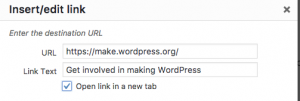
Not all screen readers alert users when a new window or tab has opened and for those with cognitive disabilities, they may have trouble interpreting what’s happened.
This can be prevented by not checking “open link in a new target” on links, so they don’t trigger new windows or tabs to open.
If you absolutely need to open a link in a new window, you need to tell your visitor in the link text.
For example:
I love cats, so I watch cat videos (opens in a new tab) on YouTube.
Link to a document
If the link opens a document, add the format of the document in the link text.
For example:
You can download the manual as PDF.
Please download our terms (PDF, 3Mb).
Resources
WCAG Success Criteria for links
By adding meaningful link text, you meet WCAG success criteria
- 2.4.4 Link Purpose (In Context) (level A).
- 2.4.9 Link Purpose (Link Only) (level AAA).
- 2.5.3 Label in Name (level A).
- 3.2.5 Change on Request (level AAA).
Related pages in this documentation
No links opening new windows or tabs without warning in the Theme guidelines for the WordPress accessibility-ready program.
Other resources
- Link Targets and 3.2.5, by Adrian Roselli. Designing Better Links UX on Smart Interface Design Patterns.
- Opening new windows and tabs from a link only when necessary, by the W3C.
- Creating the perfect link, by The A11Y Collective.