 WP Accessibility Knowledge Base
The accessible name
Give an (interactive) HTML element the correct accessible name.
Accessible names convey the purpose or intent of the element. This helps users understand what the element is for and how they can interact with it. - Accessible name on MDN.
Why is this important?
- Screen readers will announce the name, role, value or status when an interactive element gets keyboard focus.
- Voice recognition (voice control) users can focus an interactive element by announcing its name.
A proper accessible name for HTML elements is essential for screen reader users to understand and operate functionality on a web page.
Abdulqudus Abubakre gives an excellent, detailed writeup of the accessible name Understanding Accessible Names in HTML.
Please note: An aria-label attribute on a link or a button overrides all textual content within.
For example, the accessible name of the button <button aria-label="Close">Open</button> is “Close”.
The accessibility tree shows the accessible name
Next to the DOM-tree a browser also generates an accessibility tree. Both are available in the inspector of every browser. Assistive technology, like a screen reader, gets the information it needs from that accessibility tree.
The way browsers show the accessibility tree differs:
- In Edge: Test accessibility using the Accessibility tab.
- In Chrome: Full accessibility tree in Chrome DevTools Tools.
- In FireFox: Accessibility inspector.
Examples clarifying the accessible name of interactive elements
Menu button:
<button aria-expanded="false">Menu</button>
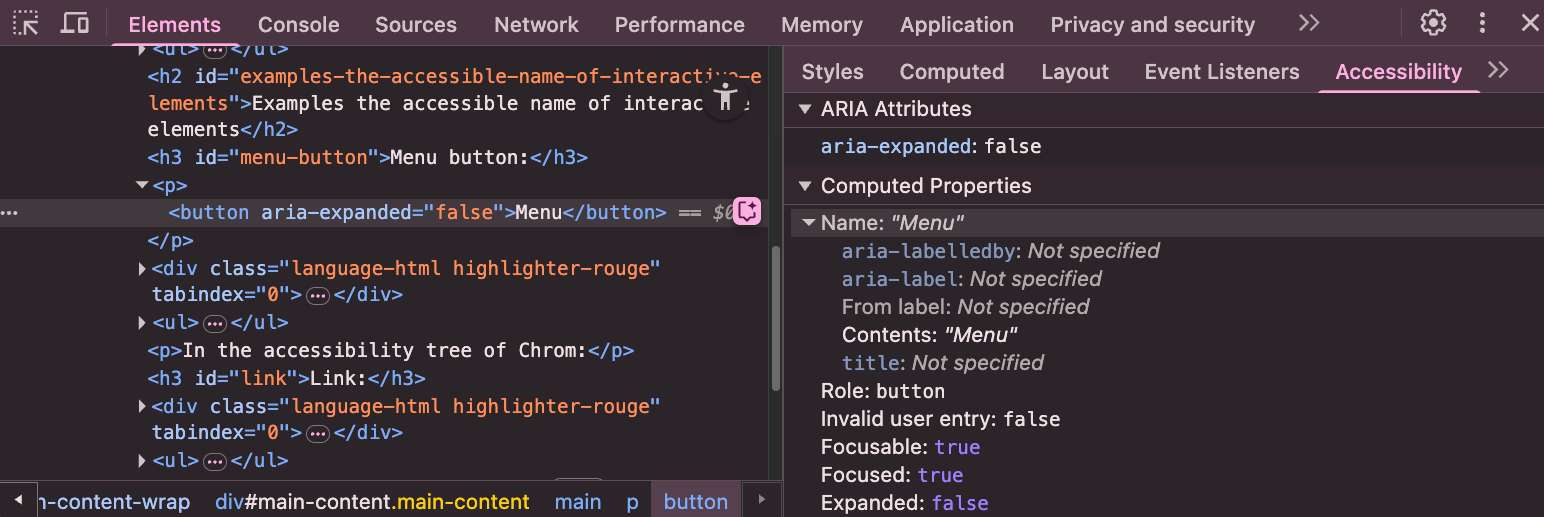
The accessibility tree of Chrome shows the following relevant information: the accessible name is taken from the content, the role is button, the element is focusable, has focus and the menu is not expanded:
- Name
aria-labelledby: Not specifiedaria-label: Not specified- From
label: Not specified - Contents: “Menu”
title: Not specified
- Role: button
- Invalid user entry: false
- Focusable: true
- Focused: true
- Expanded: false
Info: In this example the accessible name is taken from “Contents”. The other options are not specified. An accessible name can be overwritten. Here the different steps for defining an accessible name are shown and sorted in order of the computation. A value for the aria-label will overwrite the Contents value.
Link:
<a href="https://wpaccessibility.org/docs/contact/">Contact</a>
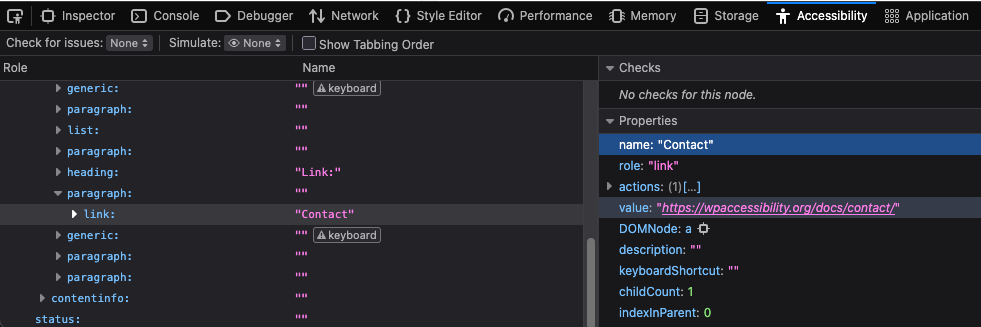
The accessibility tree of Firefox shows the following relevant information: The accessible name is contact, the role is link and the value is the url.
- name:”Contact”
- role:”link”
- value:”https://wpaccessibility.org/docs/contact/”
Resources
WCAG Success Criteria for an accessible name
Giving interactive elements a well-defined, accessible name is necessary to meet the WCAG success criteria:
- 1.3.1 Info and relationships (Level A).
- 2.4.6 Headings and labels (Level AA).
- 3.3.2 Labels or instructions (Level A).
- 4.1.2 Name, role, value (Level A).
Related pages in this documentation
- Controls with accessible names, roles, and states in the Theme guidelines for the WordPress accessibility-ready program.
- Give a form field an accessible name with a label in Standards and best practice, Web forms.
- ARIA Landmarks in Standards and best practice, Frontend code.
Other resources
- Understanding Accessible Names in HTML by Abdulqudus Abubakre.
- Accessible name by MDN
- Providing Accessible Names and Descriptions by the W3C.
- 5 rules of ARIA by the W3C.