 WP Accessibility Knowledge Base
Link destinations
Rule of thumb: Always tell a visitor what to expect when selecting a link.
Open a link in a new window or tab?
Opening a link in a new window or tab unexpectedly can disorient users. It also breaks the “back button”. The best practice is to let users decide if they want to open a link in a new tab or window.
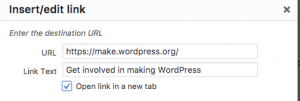
Not all screen readers alert users when a new window or tab has opened and for those with cognitive disabilities, they may have trouble interpreting what’s happened.
This can be prevented by not checking “open link in a new target” on links, so they don’t trigger new windows or tabs to open.
But what if you insist?
If you absolutely need to open a link in a new window, you need to tell your visitor in the link text.
For example: I love cats, so I watch cat videos (opens in a new tab) on YouTube.
Link to a document
If the link opens a document, add the format of the document in the link text.
You can download the manual as PDF.
Resources
Related WCAG Success Criteria for links
By adding meaningful link text, you meet WCAG success criteria
- 2.4.4 Link Purpose (In Context) (level A).
- 2.5.3 Label in Name (level A).