 WP Accessibility Knowledge Base
ARIA Landmarks
ARIA landmark roles provide a method for screen reader users to navigate structural regions of a site. By default, many HTML5 elements define ARIA landmark roles which identify these regions.
All content should be inside these semantically meaningful elements so content is not missed by the user.
Most common landmark elements
| HTML5 element | Default landmark role |
|---|---|
| <header> | banner |
| <nav> | navigation |
| <main> | main |
| <aside> | complementary |
| <footer> | contentinfo |
Note that older browsers and assistive technology combinations don’t always recognize HTML5 elements and map them to the correct landmark role. In these cases you can add the role manually, like this: <header role="banner">. All browsers supported by WordPress Core support native HTML5 elements.
More information can be found at the W3C ARIA Landmarks Example. You can also review the WordPress theme accessibility guidelines, as WordPress themes are required to use landmark roles in order to apply the accessibility-ready tag.
Good example of HTML5 sectional elements
A basic example of page structure can look like this:
<!DOCTYPE html>
<html>
  <head>
    <title>Semantic HTML</title>
    <meta charset="utf-8">
  </head>
  <body>

    <header>
      <img src="logo.png" alt="We the people">
    </header>

    <nav>
      <ul>
        <li><a href="/home">Home</a></li>
        <li><a href="/about">About</a></li>
        <li><a href="/semantics">Semantics</a></li>
      </ul>
    </nav>

    <main>
      <article>
        <h1>Semantic HTML</h1>
        <p>That wasn’t so hard.</p>
      </article>
    </main>

    <aside>
      <p>Additional information.</p>
    </aside>

    <footer>
      <p>Information about the site.</p>
    </footer>
  </body>
</html>
Using this markup, screen reader users can navigate using mapped ARIA landmark roles. For example, in VoiceOver the landmark list will look like this:
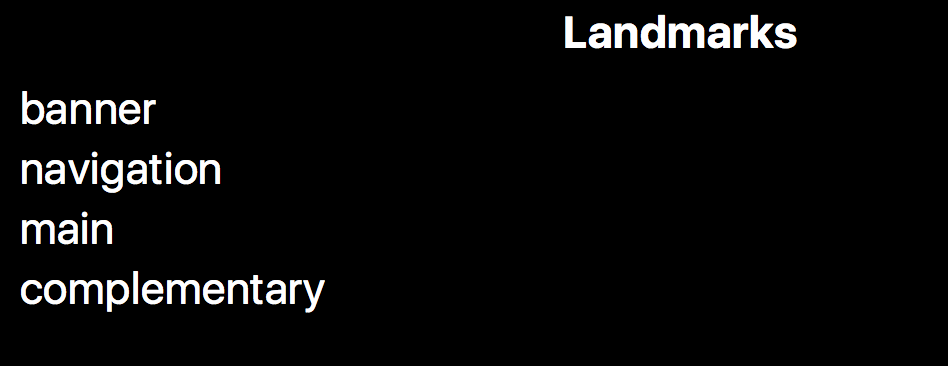
Note that the contentinfo role is missing. This is because of a VoiceOver bug. Life isn’t perfect. You can add this role manually: <footer role="contentinfo">.
Notes
If the same role appears on more than one element on a page, there should be an aria-label attribute on each of those elements. This will distinguish different landmarks. Navigation is the most common example:
<nav aria-label="Top">
<nav aria-label="Bottom">
With those aria-label attributes, screen readers will announce Top navigation and Bottom navigation, rather than navigation and navigation.
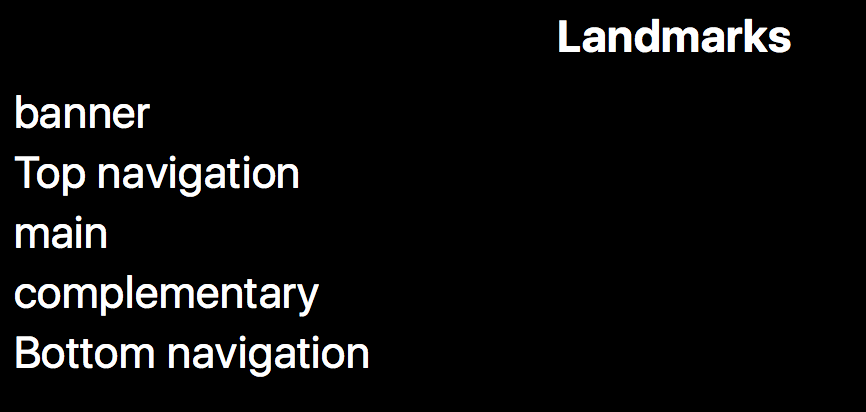
Note that the word navigation is already announced by assistive technologies. Therefore, avoid using landmark names like “navigation” in youraria-label content.
<header> and <footer> elements can also be inside other elements like <article>. But only elements which are direct descendants of the <body> tag will be exposed as header, footer, banner and ContentInfo landmarks respectively.
Resources
WCAG Success Criteria for meaningful landmarks
Providing Meaningful landmark roles and names is necessary to meet the WCAG success criteria:
- 1.3.1 Info and Relationships (Level A).
- 1.3.6 Identify purpose (Level AAA).
Related pages in this documentation
- Guidelines for the WordPress accessibility-ready tag: Meaningful landmark roles and names.
Other resources
- W3C ARIA landmark example page, by the W3C.
- Tutorial of page regions, by the W3C
Note on the W3C techniques below: while the guidance regarding why and how to use these is good, the code examples pre-date wide availability of native roles for HTML5 elements. It is preferred to use the HTML elements directly, not the role attributes.