 WP Accessibility Knowledge Base
Alternative text for images in the content
The alternative text or “alt text” is used to provide an alternative to an image for users who can’t see it. Screen readers will announce that alternative text, so visitors that can not see the image will also know what it shows and won’t miss information. How to add a good alt text in the content in WordPress?
How to implement and name images in development is addressed in the “Frontend code” section Images of this documentation.
The alternative text describes the purpose of an image
What should the alt text be? Describe (for non-visual readers) the contents and purpose of the image in the alternate text. And that purpose can depend on the context in which an image is used.
Add alt text for:
- Images that contain text that is not provided nearby.
- Images that illustrate content in the broadest sense.
Images with complex information, like infographics, should be described briefly in the alt text, and the information should be provided elsewhere on the page.
If an image is used as a link, use the link target as alt text. More about linking images in Images as links.
You can leave the alt text empty for images that are decorative and add no information to the content. Then a screen reader will skip that image and not announce it.
On the Web Accessibility Tutorials of the W3C the alt Decision Tree tool is an almost comprehensive guide that describes how to use the alt attribute of an image in various situations.
Alt text in WordPress
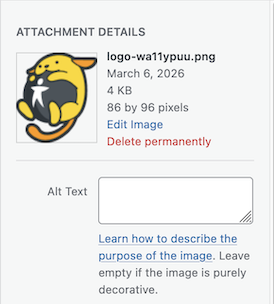
In WordPress, add the alt text for an image in the Media Library, with the Attachment Details of an image. This alt text will be used for all embedding of this image in the content.
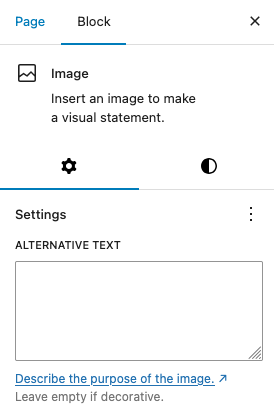
Make sure, when you add the image in the content with the Image Block, the alt text still matches the purpose if the image in the content. The alt text that image can be altered with the Block Settings and will only be used for this block.
Overall benefits of using a proper alt text.
People who can’t fully see or hear content can understand it by using a screen reader.
The alt text shows when the images are still loading, in the case of a slow internet connection.
The alt attribute helps with Search Engine Optimization. Google uses alt text along with computer vision algorithms and the contents of the page to understand the subject of the image.
Alt text also is useful for Answer Engine Optimisation (AEO), it provides essential information about the content in an image.
Examples
Don’t add “Image of”
When announcing an image, the screen reader announces the alt text and the fact that it is an image.
Don’t: Add the alt text Image of a nest of kittens.. Screen readers already add the information that it’s an image.
Do: Be brief and to the point, Add the alt text A nest of kittens..
Explain the essence of an image
Think about what you want to tell with an image and capture that in the alt text.
Don’t: Describe everything that’s on the image, like the alt text:
A photo of Jane, she is wearing her vintage dress by Dior, at the background is her garden, the sun is shining, she is smiling into the camera while holding a cup of coffee..
Be to the point, like the alt text: Jane, smiling into the camera..
Describe what’s important in the image: Jane, in vintage Dior..
Resources
Related WCAG Success Criterion for alternative text for images
By giving a meaningful image the proper alternative text, you meet WCAG success criterion 1.1.1 Non-text Content (level A).
Other resources
- An alt Decision Tree by the W3C.
- Write helpful alt text by Google.
- Are alt attributes required? Always?, by Joe Dolson.
- Image SEO: alt tag and title tag optimization, by Yoast.
- The Rules of ALT by Jon Penland.
- Text descriptions and emotion rich images by Léonie Watson.